Showing posts with label business. Show all posts

Monday, December 15, 2008

How to Be a Star at Work: 7 Rules for a Really Big Career

I read this fabulous article by Cathie Black who is president of Hearst Magazines, which publishes O, The Oprah Magazine. In it she presents seven ways to get ahead in your professional career. I thought it was very timely, so here it is, taken from oprah.com.


How to Be a Star at Work: 7 Rules for a Really Big Career
By Cathie Black

From a lowly sales assistant to head of a magazine empire (...) Cathie Black has boldly gone where no woman has gone before. Here, in a preview of her forthcoming book, Basic Black, she shares her unorthodox (dare we say daredevil) strategies for getting ahead.

Thousands of years ago, a handful of fortune-tellers roamed ancient China, traveling to the palaces of Mandarins and predicting the future. When they were right, they were showered with riches and praised at lavish banquets. When they were wrong, they were boiled alive.

Taking a risk is scary when you focus on what can go wrong and exciting when you consider the benefits if all goes well. The trick is to think about risk in the right way and use it to your advantage. Most people see taking risks as opening themselves up to unnecessary, even dangerous, chance. But the truth is, avoiding risk won't keep you safe, nor will it guarantee a smooth ride.

In fact, the opposite is often true. It's like the monkey parable: A monkey sees a nut in a hole and reaches in to grab it. Once he's closed his fist around it, he can't get his hand back out of the narrow opening. He can't free himself unless he lets go of the nut, but because he's afraid to lose it, he won't let go.

Trying to avoid risk is like clinging to that nut. You may think you're playing it safe by holding on to what you have, but in reality you're just hindering your own progress.

Keep reading...

Monday, May 19, 2008

Accountability (Part 1)

From Wikipedia: “Accountability is a concept in ethics with several meanings. It is often used synonymously with such concepts as answerability, enforcement, responsibility, blameworthiness, liability and other terms associated with the expectation of account-giving. As an aspect of governance, it has been central to discussions related to problems in both the public and private (corporation) worlds. […]

In leadership roles, accountability is the acknowledgment and assumption of responsibility for actions,
products, decisions, and policies including the administration, governance and implementation within the scope of the role or employment position and encompassing the obligation to report, explain and be answerable for resulting consequences.”

A few years ago I worked for a Swedish company; one of its core values was “freedom with accountability” which meant that employees were free to act as they saw fit, considering the core values, mission and vision of the company.

So as long as the objectives were met, we were able to come and go from the office, to make our own decisions, to use the company’s resources and to assess situations based on our own principles.

The way most of us responded to this policy was to actually be more responsible, more committed. It taught us that we didn’t need a cop breathing down our necks for us to do better work, to strive for better results, to handle things in on time.

In other words, the company allowed us freedom to choose our courses of action, and in return it got better results from us.

I realize that not everybody will react to such policies in this manner, but rather try to take advantage of the situation to procrastinate and be lazy. Of course in the end, the consequences will be paid.

I am a full supporter of such policies. I believe that being clear about expectations with employees will make it easier to implement these proceedings and, if all goes well, most people will respond the way we did in the Swedish company.

I’m going to touch on three subjects related to accountability: office hours, office site perks and IM in the workplace.


Office hours

There’s usually some office hours policy, right? You’re supposed to go in at certain time in the morning and you’re supposed to leave at some other time in the evening. And you’re supposed to take a fixed amount of time at lunch. This generally applies to everybody except people in sales, or high level managers.

Whenever I’ve been forced to follow the office hours policy, I’ve found myself getting there on time and leaving on time. Not one minute extra. Why? Because it infuriates me that performance and results are measured on a how-long-are-you-at-your-seat basis.

However, whenever I’ve been free to handle my working hours I’ve found myself being more committed to the tasks, mainly because I feel more empowered to manage my time as I see fit, given of course, that I am clear about expectations.

But what exactly are we talking about here?

• Yes, there are office hours, but if you have a personal issue, you can go solve it before coming to the office (Provided this doesn’t cause any trauma on the operation) or leave early to do so.

• Projects and results are evaluated based on completion and quality, instead of how many hours you put into them.

• Weekends are sacred and only you can choose whether or not you go in the office on a weekend to finish something.

• The same goes for after work hours.

• It is expected for the employee to try to balance his working hours with his personal time, as it is vital that employees are rested and energetic to achieve top results in projects.

• It is understood that some personal issues are more important than work.

• People are entitled to take as many breaks as they feel necessary during the day.


Whenever I’ve used these concepts in my experience, employees have never disappointed me.
I leave it out to the community to share some comments about this and about their experiences.

Come back next time, to read Part 2, about office site perks.

Monday, May 12, 2008

In-house designers beware…

A few days ago I stumbled across this passage from “Pulling Your Own Strings” published in 1978 by Wayne Dyer.

(From Wikipedia: Dr. Wayne Walter Dyer is a popular American self-help advocate, author and lecturer. His 1976 book Your Erroneous Zones has sold over 30 million copies and is one of the best-selling books of all time).

I thought it would be useful to publish here, as a call to reality for all in-house designers. All comments are welcome.


"How Institutions Work

Business institutions exist for one reason: to make profits. They seek only to perpetuate themselves so as to return dollars to the people who have taken the risks of financing them and manufacturing the products or delivering the services.

They are not in business for charity, and they don’t pretend to be. Therefore, any victimizing you experience as a result of your connection to an institution has probably come about because you allowed it to happen.

If you believe a business institution owes you some kind of loyalty and ought to reward your long service with a lot of benefits to you as a person, then you are carrying around groundless illusions.

The institution will attempt to deal with you in as utilitarian a fashion as possible. It will pay you for your services until you can no longer deliver the services it needs, and then you will be dismissed in as inexpensive a manner as possible.

This is not a sour view of business in western culture; it is simply the way things are. Whenever you become an employee of an institution, this is the implied agreement. Even if it has such things as pension plans, profit sharing, incentive programs, or any other devices designed to hold on to employees, the fact remains that when it doesn’t need you any more, you will be replaced, and every effort will be made to get rid of you as cheaply as possible.

Institutions simply do what they’re designed to do, and there is no complaining about them being written in these pages. But you are not an institution. You are a human being who breathes and feels and experiences life.

You do not have to be upset about the way businesses operate, nor do you have to commit yourself slavishly to institutions just because you are encouraged to do so by institutional spokesmen who stand to gain by your self-victimizing loyalty.

The man who retires after devoting fifty years of unflagging service to a company, and receives a gold watch and a small pension for his lifetime of devotion, has not been victimized by the institution. It owes him nothing, so he should feel grateful for the watch. He did his job and received his paychecks, and the company received his services. That is the way it’s supposed to be.

But the retiree has been victimized if he has devoted himself beyond normal requirements and sacrificed his own personal goals and his family activities, because institutions do nothing but continue on, whether you kill yourself for them or simply see them as ways for you to make your living."


In my opinion, even though you must bring excellence and commitment to everything you do, it would be foolish to ignore the reality of how companies work and to regret the personal time that you sacrificed for them.

Tuesday, May 06, 2008

To design or not to design?

That is the question, indeed. As I’ve said in my profile, I graduated as an industrial designer. However, in my career I’ve never worked with product design. What have I been doing all these years, then? Read on to find out.

When I graduated I landed a job as “designer” for a big multinational company. The job entitled working with digital files of packaging and doing prepress processes. I wasn’t too crazy about it, but I enjoyed the work.

A few months later, I was promoted to head of the department, with one person reporting to me. So now I was in charge not only of the technical aspect of the work, but also of the administrative aspect of the work. Budgets, deadlines, processes, procedures, policies, internal communications, suppliers, staff development, you name it.

And I loved it.

Was it stressful? Hell, yeah! But I really enjoyed that part of the business.

After that job I went on to work in several other companies, doing business or design process related things, but never actually designing. And there came a point when I just admitted that I enjoyed the business aspect of design, more than designing itself. Not only that, I didn’t miss industrial design per se, at all. It could be graphic design or branding.

Where am I going with this, you ask? Bear with me a bit more…

A couple of weeks ago Oprah Winfrey did a show on women who hated their jobs. The special guest was Marcus Buckingham, a career expert from England. Marcus designed a workshop to help people determine a plan to make the best of their professional lives, be it figuring out how to make your job match your strengths, or having the guts to quit it once and for all.

The workshop focuses on figuring out what your strengths and weaknesses are, but seeing these two concepts under a different light, which I thought was very interesting.

Strengths are defined as activities that you do, that invigorate you. How do you know? Because when you’re doing them you get really focused, it’s easy for you to concentrate and you look forward to doing them.

Weaknesses are defined as activities that you do, that drain you. How do you know? Because when you do them, it’s hard to concentrate, you’re always coming up with excuses not to do them, you dread going to work to do them and you feel like they take away your energy.

Pretty easy, huh?


Well, I took the workshop and came to realizations that I was reluctant to admit, but that will help me in the decisions I’m going to make about where I want to go with my career. Maybe I will tell you about those conclusions in another article sometime.

But my point is that just because you graduated from college with a certain degree, doesn’t mean that that’s who you are or what you’re supposed to do for a living. And as Wayne Dyer would say: “Who would trust a seventeen year old with career choices?”.

Maybe I don’t want to be a designer… maybe I want to move to other design related areas like management or teaching… Or maybe I want to try a different design discipline like graphic or interior design, who knows? The future is not written!

And only you can figure out what it is that strengthen or weaken you. I suggest you take the workshop . It’s free!

All the best!

Monday, March 03, 2008

Business Skills Every Creative Needs to Know, Now!

Last week’s HOW’s Newsletter was packed with business related articles for all designers! These articles contain basic information about the design business in general. True, some of them apply only in the US, but they’re worth a read nevertheless.

Among the different titles you can find:

Designers' Hourly Rates See what other designers in the country are charging for their work and how they determine those rates.
Make The Most of Downtime At Work When work gets slow, here are 6 ways to use that extra time to your advantage.
Are You Ready To Freelance Full-Time? Look at our checklist to find out!
Be Your Client's Best Friend 8 ways to keep clients happy.
How to Motivate Every Type of Creative Get specific ideas for encouraging—and getting the best from—any designer.

There are about 90 articles to choose from, so browse around!

Monday, February 18, 2008

Is disorganization and lack of planning effective?

I used to be pretty disorganized when working or doing a project. Then I discovered the many benefits of being organized. And then… there comes a project that made me question if being organized all the time really paid off.

The latest project I embarked in consisted of many items, all showing up at once, handling a massive amount of incoming information and then analyzing, organizing, deciding. This naturally led me to get ready to plan and implement databases and tools to keep track of everything.

But just when I was ready to do that, the person for whom I was doing the project implied that maybe my thoroughness wasn’t really necessary in this case, but rather intrusive and time consuming.

I was resistant, at first, after all, I know how to handle my own information, thank you very much! But then I decided to listen.

So I started questioning my own usual procedures:

- Is a database really necessary?
- How complete should it be?
- What fields should it have?
- Do I need to leave a record of every single item?
- What if I only left a record of the items that were going to go on?
- How can I make this effort more effective?
- What activities don’t have any added value?
- How can I do things more quickly, without sacrificing quality?
- Do I have to follow a predefined set of activities?

So instead of using a huge database with tons of information that I wasn’t immediately going to use, and that I could refer to later, I decided to do things simple.

A mixture of digital (database) and analog (notes and printed materials) mediums to keep track and be effective.

So I realized that I don’t always have to be ultra organized, that some projects don’t need to leave records of everything behind and that they can be done in less time, using less resources, if you’re just open to new ways of doing things and listening to what the customer actually wants and needs.

The moral of the story is, question your own procedures from time to time, you may find new and interesting ways of tackling your projects.

All the best!

Monday, December 17, 2007

Getting a client, instead of an occasional buyer

cli·ent
–noun 1. a person or group that uses the professional advice or services of a lawyer, accountant, advertising agency, architect, etc.

But, I think we all know a client is much more than that, don’t we?


Clients pay for the service you provide for them. Give good service, and you will:
- Have a loyal client that keeps coming back for more, providing you in return, with steady income.
- Have a client that will give his friends good references of you, providing you with more work.
- Get an ally and a friend that will help your business grow, while you make theirs, grow.

Sounds great, right?

And how exactly do you get to that point?

Allow me to illustrate with a recent experience of mine:

A couple of weeks ago I wanted to buy a watch, so I went to the mall. There were about five stores that carried the kind of watch I wanted. So I went to the first store and requested the watch, and they had it, except they carried it in light blue and pink.

“Hmm, I’d rather it was black” I said to the sales guy. “We don’t carry it in black” he said. So I replied “Great, let me check other stores and see if I can find it. If I don’t, I’ll come back and buy one of these”, to which he replied “You’re not going to find it in this mall. We’re the only ones who carry this particular model, so you might as well buy it right away”.

“Thanks” I said, “I’ll take my chances”.

The second store I visited carried the watch and guess what: They had it in black! The sales lady was very polite, told me the price, allowed me to try it on… But I still wanted to see if I could get a better price somewhere else. “Thanks” I said, “I’ll check other stores and come back if I decide to buy this one”. “Great!” she said, “I’ll be here if you need me”.

Surely enough, I went to other stores, they all carried the watch in different colors, including black. Where do you think I went back to buy the watch?

See the difference? The first guy was interested in making THIS particular sale and getting his commission. The second lady was interested in what I wanted. I wanted a black watch, at a better price.
Sure, she wanted to sell hers too, but she was more focused on providing a service and letting the customer get the best deal (And of course, she was confident that I could not get a better price anywhere else). She was also very friendly and provided me with great service by giving me information and allowing me to try it on.

If I ever need to buy another watch, or if I know of someone that needs one, I’ll recommend that particular store. She got herself a client.

If I had bought the watch at the first store just because I couldn’t find it anywhere else, I would’ve become an occasional buyer and would have never come back. And I am not coming back.

Who’s more intelligent? I bet by now you get my point…

Think of providing a service, a great service, instead of thinking about how to make one sale. Think of what the client wants and give it to them. It may be that the client doesn’t actually buy from you now, but they will remember you and come back if they see that you’re eager to provide them with value, rather than just take their money.

All the best!

Tuesday, October 30, 2007

Time Tracking Tool

Like most designers, I hated Excel. Then one day the best boss I ever had (an engineer, by the way) introduced me to the wonderful world of spreadsheets.

Excel is a very powerful tool once you get to know it. I don’t know that much, actually, but I have developed a few tools to keep track of design traffic and time. Last year I wrote about time measurement and mentioned briefly how to go about tracking time and tasks.

Today I want to go deeper and share with you a tool I created to track the time and activities you do on a daily basis.

It’s pretty simple. With it you can:

· Establish categories for your activities.
· Know how much time you’re spending in such activities, and filter by category.
· Find out if you’re wasting time in meaningless tasks.
· Find out if there are tasks you can delegate, empowering your employees.
· Measure how much time you’re spending at the office.

Also, as I said in the article I mentioned earlier:

You may find that it's more effective to hire a consultant to take care of certain time consuming activities or you may even ask for your suppliers to absorb such activities which would make your operation even more effective.

You need to be aware of how long do your typical projects take, in order to have accurate planning, and how much to charge.

You can plan more strategically ahead of time so that you know if you need to get some outside help for that big project that will be coming next week or if you have some free time to spend on leadership activities with your staff. In other words, when you know how long will your projects take and how they're organized in any given time frame, you get a broader vision of your business.


So without further ado, here’s the tool and the instructions:

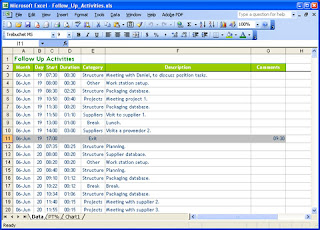
I call it my "Follow Up Activities" spreadsheet. You can download the Excel file here. This is the file as I use it, and this file has been filled for activities for five days, as an example, but feel free to adapt it to your needs!
It’s basically a table with the following fields: Month, Day, Start, Duration, Category, Description and Comments.


Month: This is a text field. I like to name it "00-mmm" where “00” is the number of the month (for instance June would be 06) and “mmm” is the first three letters of the month’s name. Why? Because it allows me to sort by number of the month, instead of the name, so that January will always be at the top, for example.

Day: This is a number field. Type number of the current day.

Start: This is a date/hour field. Type the hour of the day in which that particular activity started, in 24 hour format.

Duration: It’s a date/hour field, with a formula where the duration of the activity is calculated by the starting time of the following task minus the starting time of the previous task. In the picture above the formula would be =C4-C3 for the first cell and then that is copied down on the cells of the D column.

Category: This is a text field. You define the categories of activities. In this example I’ve created seven categories. There’s one called “Breaks” where I record the times I spend on breaks and lunches.

Description: This is a text field. Type a description of the task. I use the same name for the same activity for example I always write “Packaging database” for that particular activity instead of using several different names for it.

Comments: This is a text field. If you wish to add something else like who you met with or if the project was billed, etc.


Now for some instructions:

· Data should be input by the minute, every time you change activity, you need to go there and input that information. This is key, and it needs to be done rigorously and with discipline. This way you always have current information and you're not stuck with having to type several days worth of information.

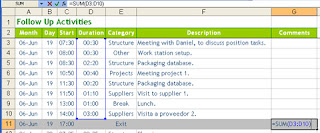
· The last activity of the day is called “Exit”. You only type the start time, but you must erase the formula in the “Duration” field for this activity.

· When the day ends, I like to use the “Comments” cell of the activity to add up the total hours I spent at the office that day. This is just a SUM formula that adds up the duration of all the activities. For instance in this particular day I was at the office nine and a half hours.


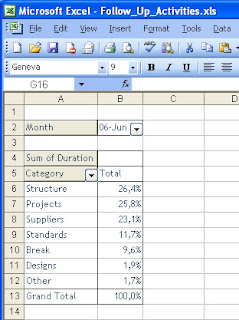
· There’s another worksheet in the Excel file, called "PT%", where I’ve added a Pivot Table report that will tell me how much time I’ve spent in each category or task. Pivot Tables are dynamic, and I can change the fields at leisure. For instance, instead of percentage, I can change it to hours.


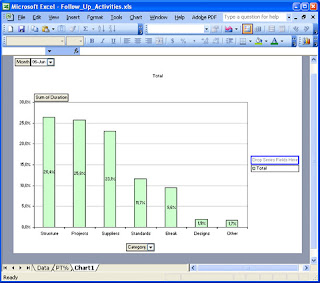
· And I’ve also added a graph to illustrate those times.


Neat, huh? Well, I think so. Do leave some comments if you have some ideas about how to improve this tool!

All the best!

Tuesday, October 23, 2007

Design resources: 2 articles

Here’s two articles I read this week from How Magazine, that I want to share with my readership.

Get A Life (And Other Remedies for Creative Atrophy) by Jenny Pfalzgraf.
When creative impulses are few and far between , designers often turn to outside sources for a boost. Whether it's hiking in the mountains, getting a tattoo or bringing your pet iguana to the office, this freedom to explore your inner child feeds your business finesse.

The Proof is in the Process by George Shaw
A teacher once told me, "Anyone can be creative on their best day. If you want to make a living at this stuff (graphic design), you've got to be creative on the days when your car breaks down and your wife leaves you." I thought he was trying to get me to listen to country music, but eventually, I figured out what he was talking about.

All the best!

Monday, October 08, 2007

Learn English!

As I’ve said before, Latin American designers must speak English. This will open up doors for them everywhere!

However, I am not the bearer of good news. I think when it comes to English (or any other foreign language, for that matter) there are two kinds of people:

· Those that really have to work at it.
· Those for whom it just comes easy.

Unfortunately most people are in the first group, and that’s the bad news. Such people need to really work at it and be disciplined to learn.

There are basically two (and a half) ways to learn English, in my opinion:


Option 1: Take a course.

This means doing all the exercises and walking the extra mile by enrolling in every English speaking activity they can think of. Watching TV in English (no subtitles) like news and movies, listening to music in English, attending events organized by the UK and American Embassies or English institutes such as Berlitz.

So, if you’re up for the challenge of being consistent, disciplined and reaching your goals, this is a way to do it. If this option speaks to you, allow me to recommend the British Council and Wall Street as two good institutes.

Unfortunately, I don’t know the first person that has really learned like this. Learn to speak well, I mean. Anyone can “kind of speak pigeon English”.


Option 2: Travel abroad.

In my opinion, this is the fastest and best way to learn English. And most people have this idea that maybe it’s too expensive. I can assure you, there is always a way. Spend at least six months abroad, learning. I recommend you do this through an institute, so that you have some structure to follow.


Now here comes the “half”:

For those special people for whom English comes easy (like me, it’s a gift) there is another way. I never did go abroad to learn English, the first time I went to the US, I’d been speaking English for years. In fact, I learned in about six months when I was twelve years old.

How? I used to be a TV-holic, so just by watching English spoken TV shows with closed captioning (subtitles in English) I learned how to use sentences, the context, grammar and pronunciation. I did help myself with some English textbooks to understand the structure better.

If you are this kind of person, congratulations! All you have to do now is work at it, so that you won’t forget it. Watch TV, listen to shows and write in English daily!

And here's a little tip for all of you who are learning: Don't over pronounce words so much. We spanish-speaking people tend to over pronounce, but in english there's no need to do that. In fact, english can be pretty much mumbled and it will still sound ok. This will make your speech sound more natural, less latin.


I guess the advantages of speaking English are obvious:

· You can access tons of information on the web (and many different sources, such as books and newsletters), about every topic imaginable.
· Podcasts and audiobooks are at your disposal.
· You can join networking communities online and exchange information with people from all over the world.
· Out of this networking, great business opportunities may arise.
· Access to the latest global news.
· A valuable asset for your resume.

I have an English friend (from England, actually) who’s learning Spanish and he says that as an English speaking person, if he learns Spanish, he’ll be able to communicate with the vast majority of the planet. I think he’s right.

And in this day and age, Colombian (and Latin American) designers cannot afford to be left behind.

All the best!

Monday, October 01, 2007

Design resources: Springwise.com and Trendwatching.com

This week I’m going to present young designers with two more resources they can use to expand their creativity and be on top of the latest news.


Springwise.com


“Springwise and its network of 8,000 spotters scan the globe for smart new business ideas, delivering instant inspiration to entrepreneurial minds from San Francisco to Singapore. Time to start the Next Big Thing!

Springwise scans the globe for the most promising business ventures, ideas and concepts ready for regional or international adaptation, expansion, partnering, investments or cooperation. Ferociously tracking more than 400 global offline and online business resources, as well as taking to the streets of world cities, digital cameras at hand.”
Need I say more? In Springwise you’ll find the latest, most wackiest and smartest business ideas from around the globe. It will:

· Be a source if design inspiration.
· Be a source of news and design trends.
· Be a source of practical ideas even you can implement.

Check it out and subscribe to the free newsletter! The latest issue covered:

Product placement agency targets YouTube
Marketing & advertising

Crowdfunding software projects
Media & publishing

Zero cents per minute Update
Telecom & mobile / Marketing & advertising

A social marketplace for clothes hounds
Fashion & beauty

Solar-powered vending machines
Eco & sustainability / Food & beverage

Helping seniors relocate
Life hacks

Free love at the food court
Marketing & advertising

Freeze-dried eco burials
Lifestyle


You can search their webpage by date or by industry, or you can even submit an idea!
Why not give it a try?


Trendwatching.com


“Trendwatching.com is an independent and opinionated trend firm, scanning the globe for the most promising consumer trends, insights and related hands-on business ideas. For the latest and greatest, we rely on our network of 8,000+ spotters in more than 70 countries worldwide.

Most of our findings are aggregated in a free, monthly Trend Briefing, which is sent to 130,000+ business professionals in more than 120 countries. (…) Our trend findings help marketers, CEOs, researchers, and anyone else interested in the future of business and consumerism, to dream up new goods, services and experiences for (or even better, with) their customers.”


In other words, they spot market trends, given them a name and then they follow up on them and show different examples. Some of the trends are:

5*STAR*LIVING
(AFTER) SPOILING DATE
BEING SPACES
BRAND SPACES
BRANDED BRANDS
COUNTER-GOOGLING
COUNTERVALS
CRIBTIMONIALS
CROWD CLOUT
CURATED CONSUMPTION
CUSTOMER-MADE

Visit their trend page, to see more!

This is where the world is headed, so designers, beware!

All the best!

Monday, September 17, 2007

Design Resources: Design Management Institute, DMI.

Hello, there, Everybody! It’s been a long while! Do forgive me, life has been hectic. Anyway…

Here’s another wonderful resource I think designers from all over the world should know about, the Design Management Institute in Boston, US.

I learned about DMI several years ago when I was on a quest to find more information about design management. As they put it:


“The Design Management Institute (DMI) is an international nonprofit organization that seeks to heighten awareness of design as an essential part of business strategy. Founded in 1975, DMI has become the leading resource and international authority on design management. DMI has earned a reputation
worldwide as a multifaceted resource, providing invaluable know-how, tools and raining through its
conferences, seminars, membership program, and publications."

The thing I like the most about DMI is that they are an unlimited source of information and education for any designer, even for us, who don’t live in the US, with the online tools (like Webinars) they’ve got.

There are also many conferences and seminars people in the US can attend. The agenda for October includes:

Design Research for Product and Service Innovation in Chicago.
Law Meets Design in New York.
From What’s Possible to What’s Right online.

Check out DMI’s calendar.


Most of the conferences and seminars are not free, but fairly priced and the topics are really interesting, because they cover design management issues that they don’t teach you at school (Or at least not my school).

Do click around their website to see all the different resources (They even have a job bank) and/or subscribe to their newsletter to get the latest news!

All the best!

Sunday, July 08, 2007

Beginners guide to making money on the internet

Hello, Everybody! Today I bring you a guest post from John Mitchell. Very interesting read. Enjoy.

This is part 1 of my step by step beginners guide for making money on the Internet.All the Programs listed below are proven to generate income.

Step 1: Join Quidco.
Quidco is fantastic. It's a site that gives you cash back when you visit online merchants through them.When you buy or join anything through Quidco the merchant pays Quidco a reward, Quidco then passes 100% of that reward back to you.They charge you £5 a year admin fee, which they take out of your earnings.
Some of the Web's top merchants are there, e.g. Play.com, HMV, Tesco, Ebuyer. In all there are 1400 merchants currently listed on Quidco.Before you buy anything check to see if it's available on Quidco by clicking here

Step 2: Join Ciao.
Ciao send you surveys over email. For each survey you complete Ciao will pay you for your time.The amount varies for each survey but is generally between 50p and £2.50 and you can normally complete the surveys in a number of mins.
Ciao send me a number of surveys every week, and the money really adds up.It's useful to make sure that your profile is up to date to make sure that you get as many surveys as possible.
Click here to join Ciao.

Step 3: Join YouGovYougov is similar to Ciao. They send you surveys to your email address and they pay you to take part. They don't send as many surveys as Ciao but the surveys tend to be slightly more straight forward to complete.
Click here to join YouGov

Step 4: Join Clixsense
Clixsense is a site that pays you to look at adverts. Every time you log in click on the link to view adverts and a list of available adverts is displayed. Each advert is worth a different value and when you look at the advert for 30 seconds your account is accredited with that value. Generally the ad's are worth between 1 and 5 cents to view.
I know this doesn't sound like a lot of money but there are several adverts everyday and it soon adds up.Click here to join Clixsense

Step 5: Join Media Dollarz
Finally in this part a real freebie to start you on your money making way.
Media Dollarz is a company similar to Quidco. They pay you to join trials and shop with merchants.Media Dollarz will pay you $2.50 just for joining and validating your account. You are then free to withdraw the money into a paypal account as soon as you like. Free Money in mins.
Click here to join Media Dollarz


John Mitchell is an author of 3 Blogs, he is running a project to investigate how the Internet can be used by everyone to generate an income.His blogs can be found at:
http://webdosh.blogspot.com/
http://ourpieceoftheriver.blogspot.com/
http://chocolate-recipes-for-you.blogspot.com/

Saturday, May 05, 2007

Designers beware: 5S Phase 5, Shitsuke (Improve)

Welcome back to my series on 5S, the methodology to improve organization, order and cleanliness. In this article I cover the fifth phase, Improve. If you’ve made it this far, allow me to congratulate you!

But first, if you’re seeing this article and haven’t read the previous four:
Introduction to the methodology
Phase one, Select
Phase two, Organize
Phase three, Clean
Phase four, Standardize


Phase five, Improve

The purpose of this phase is to maintain the achieved conditions and establish new goals for improvement. When you improve you:

- Keep the order that you achieved during Seiton.
- Items return to their assigned place.
- Hardware and workstations are cleaned regularly.
- People enjoy a great work environment and are proud of their places of work.


And the steps:

Step 1: Redefine
You’d establish a standard, right? Now go back to the questions you asked yourself during phases 1 and 2 and ask them again against your current standard. Is there anything that can be done better? Something that doesn’t need to be in the work space?


Step 2: Document
Once you’ve gone through the questions again, see if the standard changed. If so, document again, take a new picture and post it in a visible place.

Here is a picture of the final standard for my desk, though I later on replaced the CD burner for an internal drive. Where are the pens you ask? Neatly stowed away in the drawers.


As a bonus, here I’m showing you a picture of my current desk, still applying the 5S philosophy.


This is my pencil box. It includes only what’s needed. Black, blue and red pens, a pencil, a highlighter and a calendar (Though now that I think about it, does the calendar need to be there? I have one in my computer dashboard… hmm…)


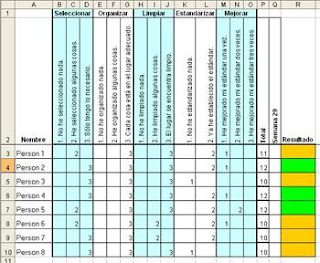
Step 3: Audit
Ok, so by now everybody in the organization has their standards. It’s time to audit their implementation. How to measure and evaluate progress is really up to the team and the criteria they want to apply.

Here’s an example I’ve used to audit offices. We did it weekly, for about a month.

Criteria to evaluate in each step:

Select
I haven’t selected anything (Earns 1 point).
I’ve selected some things (Earns 2 points).
I have only what I need (Earns 3 points).

Organize
I haven’t organized anything (Earns 1 point).
I’ve organized some things (Earns 2 points).
Every item has and is in its place (Earns 3 points).

Clean
I haven’t cleaned anything (Earns 1 point).
I’ve cleaned some things (Earns 2 points).
My work place is clean (Earns 3 points).

Standardize
I haven’t standardized anything (Earns 1 point).
I’ve established the standard (Earns 2 points).

Improve
I’ve improved the standard once (Earns 1 point).
I’ve improved the standard twice (Earns 2 points).
I’ve improved the standard three times or more (Earns 3 points).


Here’s an example of an Excel table to record and count the points:


After counting the points the person gets a card:

Red card, if the person earned between 5 and 10 points. There’s big room for improvement here.

Yellow card, if the person earned between 10 and 12 points. There’s still room for improvement.

Green card, if the person earned between 12 and 14 points. The work space is very neat and clean!

The idea is for the cards to be displayed in the work area so that maybe a little competition between the people in the team sparks up to get to green in the four weeks of the audit process.

And that’s it for this phase and for the 5S!

It’s a good idea to repeat the audit process in a few months, to see if the team keeps the new conditions.

I hope you’ve enjoyed this series and that your workplaces are areas of productiveness and pride!
All the best!

Saturday, April 21, 2007

Designers beware: 5S Phase 3, Seiso (Clean)

Welcome back to my series on 5S, the methodology to improve organization, order and cleanliness. In this article I cover the third phase, Clean.

But first, if you’re seeing this article and haven’t read the previous three:
Introduction to the methodology
Phase one, Select
Phase two, Organize

Last week I covered Seiton, where we organized and decided the place for everything. The next phase, Seiso, is about cleaning. Though the methodology lists Seiso as the third phase, it’s possible to clean before you decide where things go.


Phase three, Clean

The purpose of this phase is to eliminate the sources of dirt and to find potentially dangerous areas (i.e. too many plugs in an outlet). When you clean:

- The workplace is a great place to work.
- Things are ready to be used, when needed.
- Cleaning becomes a daily habit.
- Potential safety risks can be addressed.


Now for the exercise:

Step 1: Get ready
Get your supplies like rags and cleaning products and have them ready beforehand.

Step 2: Clean
Pretty straightforward, right? Make sure to be thorough and don’t forget those out of reach places that nobody wants to clean.

Step 3: Place
Place every item in the work area in their decided location.

Step 4: Audit
Once everybody has cleaned their work area, allow for some time, maybe half an hour, in which each person questions how clean every work place is and uses the red labels again, if it’s the case, meaning, if something shouldn’t be in that spot or could be relocated.

And that’s it for this phase!

In industrial environments it has a bigger impact because operators learn more about their machines and see potential industrial risks, like leaks and parts that aren’t working properly, but that’s material for other posts.

By now you’re already seeing the benefits of applying the 5S and if you’ve really embraced it, you’ll notice that you’ve started questioning how other people keep their desks or their houses, haven’t you?

As I said in the first 5S post, you’ll never be the same!

So meet me here next time to cover Phase 4, Seiketsu (Standardize).
All the best!

Sunday, April 15, 2007

Designers beware: 5S Phase 2, Seiton (Organize)

Welcome back to my series on 5S, the methodology to improve organization, order and cleanliness. In this article I cover the second phase, Organize.

But first, if you want to go back to the two previous articles:
Introduction to the methodology
Phase one, Select

Let’s pick up where we left off. Last week I talked about Seiri, to select. At the end of the exercise we had two piles of stuff:

Pile C: The stuff that needs to be in the work space.
Pile D: The stuff that is needed, but not in the immediate work area.


Phase two, Organize

The purpose of this phase is to assign the correct place for each item.

- This will eliminate unnecessary movement because the needed elements are nearby.
- You’ll find elements quicker.
- Error is reduced.
- There are visible clues of where the elements are placed and their quantity.
- The basis for standardization is laid out.


Now for the exercise:

Step 1: Classify
Think about how often you use each item according to the following criteria:

- Infrequent: Things that are used monthly. These can be placed further from the working area.
- Frequent: Things that are used weekly. These can be placed inside the nearby area.
- Very frequent: Things that are used daily. These should be placed in the working area.


Step 2: Quantify
Determine how much of each item is needed in the place where they will be stored. For instance, you may need one black marker on your desk, not five, so the other four can go to the supplies room. Now how many should there be in the supplies room?


Step 3: Place
Determine the exact place where each item goes according to the task they’re used for. Elements needed for the task performed in the specific work area should be inside it.

Group elements according to:
- Process, if they’re used during a specific task, keep them together.
- Function, things that are used for the same purpose, should be kept together.
- Order, things that are used in a certain order, should be placed in a way that will reflect it.


Step 4: Evaluate
Ask yourself:
- Is it obvious when something is missing from its spot?
- Is it obvious when something is there, that shouldn’t be there?
- Do the objects that can be moved, return to their spot?
- Is it visible when you’re running out of supplies?

This step could even include visual clues like contour lines around the spot where things are stored, tags, or quantity indicators to show the maximum amount and the minimum amount so that a new order can be placed.


* This image from the eBook “Estrategia de las 5S” produced by Advanced Productive Solutions, S.L. www.ceroaverias.com


Step 5: Audit
Once everybody has decided the place where everything goes, allow for some extra time, perhaps half an hour, so that everybody can question each other using red labels again. All items marked with red labels need to be relocated within the next few days.


Some additional thoughts:

It is likely that by now you’ve realized that you don’t actually need some of the things you thought you needed. In that case, you can do any of the following actions:

- Store it somewhere else.
- Move it inside the area.
- Sell it.
- Rent it.
- Return it.
- Trash it.

If it’s not needed for the task, it shouldn’t be there. Ideally the only things that should be on a desk is the computer, the immediate supplies like a pen and paper, and the stuff that you’re currently working on. Extra supplies can go in drawers.
Also, don’t forget to document the process with your digital camera.

I want to point out that in the cases of personal offices and desks, 5S is a process that every person needs to assimilate in their own way. Some people are attached to objects that for others have no significant value and this needs to be respected. Each person should take 5S as far as they feel is comfortable for them. For instance, I don’t need to have pictures of every member of my family on my desk; some people do. So beware that everybody has their own pace and nobody is allowed to decide for somebody else in this methodology.

So that’s all for today. Join me here next time to cover Phase 3, Seiso (Clean).

In the meantime let me leave you with this thought: Do you think this can be applied to, say, email, your computer desktop, the closet, the pantry?

All the best!

Sunday, April 01, 2007

Designers beware: 5 steps to productivity, the 5S.

How would you like to be more productive and have a better workplace? Would you believe me if I said that you can achieve that easily with little or no investment at all?

Would you be able to work here? Do you actually work in a place like this?


Would you like to live like this? Do you currently?


A few years ago, when I was part of the continuous improvement team of the company I worked for, I was entrusted with the task of implementing a certain methodology that promised to improve our productivity. So of course, I had to be the first to test it.

It changed me. I’ll never go back to the way I was before, immersed in clutter, with a feeling of not having any control over my stuff, my activities, my life! Being tired before even starting to work, just by glancing at my desk.

5S (Five eses, if you will) is a methodology that was developed by Japanese companies, mainly Toyota, to improve organization, order and cleanliness in work stations. It can be as extensive as you wish it to be, with thorough measurements of improvement in machinery performance in factory conditions, but as I’ll present in the upcoming posts, it can be applied to almost every aspect of life, yes, the design business included.


What can 5S do for you? Keep reading…

The name 5S responds to five Japanese words that describe each of the five steps:

1. Seiri (Select)
Identify and separate the necessary from the unnecessary items.

2. Seiton (Organize)
Everything has its place.

3. Seiso (Clean)
Identify and eliminate sources of dirt and clutter.

4. Seiketsu (Standardize)
Maintain the status of order and cleanliness achieved.

5. Shitsuke (Improve)
Make it a habit and reach new standards of order and cleanliness.


5S can be defined as an ideal state in which:

- Unnecessary materials or utensils have been eliminated.
- Everything has been identified and been assigned a place.
- Clutter has been eliminated.
- There are visual references to control the status of processes.
- All this is maintained and continuously improved.


By implementing 5S you will:

- Reduce errors.
- Reduce supplies inventory.
- Reduce unnecessary movement.
- Gain more space.
- Be proud of your work place.
- Easily recognize the status of things.
- Quickly find the utensils you need.
- Improve the image your customers have of you.
- Improve your team work and cooperation.
- Improve responsibility and commitment.


There are many resources on the web about this subject, covering all kinds of businesses and situations, big and small, where this methodology can be applied. I’ll be covering each of the steps in a design studio environment and how to implement them and measure the results.

Meet me here next time to cover step 1, Seiri, and learn how to get rid of most of your clutter and not feel guilty about it! :-)

All the best!

Saturday, March 10, 2007

Designers beware: Setting clear goals and expectations.

Lately I’ve found myself having differences of opinion with people about my ideas on how to lead a design team. I want to present a situation to the community and get some feedback on whether or not I am completely off my rocker.

Let’s say you own a small design studio or you lead an in-house team. Let’s say you hire a new designer. A young bright designer. Let’s say that this new designer is assigned a group of tasks that involve learning a new software or mastering a technology which he hasn’t been exposed to before. He’s expressed this openly to you during the selection process.

The standards or final goals are clear in your head. You know exactly what you expect from the designer.

The question is: How do you get this new designer from not knowing quite how to do the work to getting the job done as you want it?

Some might argue that if this designer is as bright as he seems, he should figure it all out on his own. Now, from my point of view, there are three things/issues he should figure out:

- One, how to work the software/new technology.
- Two, the standards the job needs to meet.
- Three, how much time he’s allowed to take to get to the expected level of performance.

Do you agree with me so far?

New set of questions: What would happen if you (the manager) fail to give information to this young designer on one of the three issues. In fact, what would happen if you refuse to provide information on all of them? What would be the odds of this designer meeting your criteria? Would you still expect him to?

Believe it or not, I’ve encountered such a situation recently.

So here’s what I think:

Issue one, yes, software and new technology usually come with manuals, and yes, there are forums on the web where a person can post his questions and get some guidance. Would this be enough?

Would it be reasonable to ask one of the designers on the team (one that knows how to work the technology) to help the young bright designer? Would it be reasonable for you to spend some time with the designer, explaining the basics of the technology? Would this help him reach the performance level quicker? I would say so, wouldn’t you?


Issue two, could the new designer guess what you expect? Let’s say he’s so brave, he went straight to you and asked about it and you ignored him because you thought explaining that would just take too much time. Would you still expect him to know how the job needs to be presented?

Again, would it be reasonable to enlist the help of another designer on the team or to perhaps spend some of your time explaining the standards that need to be met? Would this help the designer present the job according to the expectations? I would say so, wouldn’t you?


Issue three, would the designer be able to guess how long would be a reasonable time to reach the expected level of performance? Would anybody in this situation be? Would it help to inform him clearly when you expect to see results? Would it help him if you gave him a schedule of steps or small goals he needs to reach and their timeframe? I would say so, wouldn’t you?


So by now I’m guessing you’ve gotten my point. You cannot expect someone who’s new on a job to guess how things need to be done. Especially if this young bright designer is also fresh-out-of-college.

You need to give this person the tools, all the tools available, for him to learn as soon as possible. You need to inform the standards that the job has to meet and you need to be clear on deadlines, schedules and expectations. Period.

Let’s avoid the “quick-fix” mentality and let’s start building a real design team. Let’s spend time training our people so that they can be more productive now and in the long run and so that we can deliver better work.

If our schedule is so tight, let’s delegate! Other designers would be more than willing to guide the new guy! Don’t you agree? Wouldn’t you go as far as calling the attitude of the manager I’ve described as “negligent”?

I’d love to receive some comments and know what other people think. Are there people out there who can “guess” how a job needs to be done? Would they be successful if they put more “effort” into it? Am I missing something here?

All the best!

Sunday, March 04, 2007

Designers beware: Being the interviewer.

As a design manager you’re sometimes faced with the task of interviewing new designers for your organization; this can make some designers a bit nervous. Here are a few tips to be effective when interviewing other creative professionals.


Before the interview


Define the position: Before you even make the process public, you need to be clear on the responsibilities of the position. Ask yourself questions like:

- What will this person do?
- If a followed him around all day, what would I catch this person doing or saying?
- Who do you want this person to be like, on the team and why?
- Who do you want this person not to be like, on the team and why?
- What are the deliverables of the position?
- What are the behaviors the new person has to exhibit to be successful in this position?


Reply to candidates: If you can manage it, take a few seconds to let each candidate know you received their information. I do. I receive most resumes by email, so I reply immediately. I have a template response email, so I just change the name of the person. If you can’t manage it, you can do it in bulk, when you have some resumes stacked up. Not many people do this and I think it speaks well of you and your company.


Review each resume in advance: Decide the key points you’re looking for beforehand, so that you can pick those up quickly. Circle a couple of accomplishments or projects in the portfolio that catch your eye, so that you can ask the candidate about them during the interview.


Device a tracking table: Unless you’re in a big company where HR is directing the search, I’d recommend creating an Excel tracking chart for your candidates. Especially is there’s a lot of them. I don’t enter every single candidate in it, but I do keep track of those candidates that I will be interviewing based on their resume and portfolio. I include relevant information, like age, academic degree, email, date of the interview. I also color code them and leave a field open to write my impression of the interview.


During the interview


General interview tips:
- Don’t read the resume in front of the candidate.
- Ask about parts of the resume, not all of it.
- Have the questions written down.
- I like to ask them to tell me briefly about their portfolio. I actually picked this from another designer I was doing a selection process with.


Ask the right questions: As I pointed out in an earlier post, I like to ask questions that will help me to decide if the person is a good match for the position and for my team. Here are some sample questions I ask:
- How did you hear about us?
- Why did you become a designer?
- What did you expect to achieve as a designer then?
- What do you expect to achieve as a designer now?
- In what type of atmosphere/environment do
you feel most comfortable working in and do you do best working in groups or by yourself?
- What are your skills?
- What are your flaws?
- What’s your creative process?
- How does your expertise relate to our company?
- How do you think you’ll help us increase sales?
- What are your salary expectations?

You can also ask about the couple of accomplishments you circled in their resume.
Ask about a time when they did x. How did they do it and what were the results? This may be extracted from a situation that happened to you recently so that you can compare the two instances.


Evaluate the answers in a structured way: According to Manager Tools, here’s a good way of structuring your perceptions: Divide them in four categories, interpersonal, cultural, skills and technical, and for each of them write down the behaviors that led you to draw your conclusion.


Evaluate body language: I'd covered this before, but my friend Fernando Pacheco from www.saturnattacks.com reminded me that it was important to cover this here again and I agree! I look for confidence, candidness, energy and professionalism. Signs of excessive nervousness, clues on lack of confidence or inappropriate/unprofessional behavior also show through.


After the interview


Decide, right then and there: I like to make quick decisions. In this case it’s either yes, no or maybe. Decide immediately after the interview and record it in the Excel table. Avoid deciding on “maybe” too much, otherwise you’ll be stuck having to decide yes or no, later.

Inform the outcome: Again, take the time to inform the outcome of the selection process to each candidate. It can be a personalized email or a phone call if the candidate made it to the final steps.

I look forward to receiving some comments or additional tips!

All the best!

Sunday, February 18, 2007

Designers beware: 10 tips on writing emails.

If there’s one thing a designer cannot afford to be is sloppy. Ever. And we designers tend to be a bit sloppy about communication and we tend to believe that whoever doesn’t speak “design tongue” is kind of dumb.

But think again, as I’ve exposed before, it is we, the designers, that need to start expressing in the language of the people we serve.

One of the most used tools of communication for designers is of course, email. Numerous versions of blueprints and projects are sent every day, iterations, discussions about budgets, deadlines, look and feel, corrections, revisions…

It is crucial that we manage email effectively in order to not drown in our own sea of email and communicate a clear message that will help design processes run smoothly. So here are ten tips to effectively handle email:


Tip 1: Be smart about subject lines.
The subject line should provide as much information as possible about the content of the email. Be descriptive and avoid laziness. Include if applicable, the name of the customer, the project, the specific part of the project, the version, if any action needs to be taken. For example:
Nike Running Shoes Ad blueprint, version 04. Comments are expected by tomorrow noon.

I’ve literally received emails with “design” or “strawberry” in the subject line.
Another thing is to update the subject line every time you reply. As the message evolves, so should the subject line.

If there are emails that you constantly send, that have the same structure, come up with a nomenclature for them. For instance, if you send a budget update every two weeks, your subject line could be: "Nike Campaign, Budget Update for February 20th, 2007", where you would only change the date every time you send it. This makes it easier for you and your readers to archive.

You could even come up with some abbreviations to add at the end of the subject line, inside the organization. For example: AR=action required; EOM=end of message; CE=comments expected. This will help other people know up front if there’s something they need to do about it.


Tip 2: Be brief and to the point.
Bottom line up front, state the purpose of the email and the actions required in the first paragraph. This will allow the reader to decide whether they need to continue reading or not. If the emails is more than three paragraphs long, it’s better to call and follow up with a summary email.


Tip 3: Be clear on what the next step is.
And include this information in the subject line or first paragraph if possible. Tell the reader if an action is required of them and state a deadline for that action to be taken. If no action is required, inform that also. You could start the message with “fyi” which means that the email is sent only as information.


Tip 4: There are no urgent emails.
If something is urgent and needs immediate attention, call, and then follow up with an email.


Tip 5: Present ideas in a simple, easy to understand way.
As I said in a previous post:
“This is particularly important when sending emails and explaining design issues in writing. It is very easy for a customer to get confused when he receives an email and it’s not well written. Revise how much detail you want to go into when discussing matters with your clients. Little detail and you won’t be able to convey your message, too much detail and it’s likely that your counterpart will get confused.”

Also help the reader with visual aids whenever needed. Highlight issues with different colors if you need to draw attention to them. Use bullets to list things. Another thing I like to do is take a picture (JPG or PDF) of a given design and use Photoshop to circle the areas I want to discuss. I assign a number to each area and then I explain each of the numbers in writing.

Make sure your emails comply with IP Standards (Idiot Proof Standards, that is, meaning that anything that needs a manual to be understood, is not well designed).


Tip 6: Mind your spelling and grammar.
As I said in a previous post:
“Grammar and spelling do speak about your professionalism, so be aware of the image you’re presenting. Check emails for errors or typos before sending them and make sure your staff does the same.”

Tip 7: Never forward junk or chain emails.
It’s plain unprofessional and goes against the trust customers and people in general, have in you.


Tip 8: Use a signature.
One that includes your name, position and contact details. If you’re part of a design organization, standardize it and make sure everybody uses the same. This reinforces your brand and it looks professional.


Tip 9: Be professional about email.
Do not use email to solve disputes. It is always better to use personal communication first.
Don’t use email to tell on other people.
Don’t use it as a mechanism to track actions.


Tip 10: Archive your email.
In a business where there are so many subjective issues, it’s a good idea to follow up discussions and agreements with something in writing. Come up with a good archiving system to file your email and make sure you can locate it easily afterwards. Use email client rules to help you file more quickly. I’ve talked about filing systems before. Some of this principles apply to archiving email.

I look forward to receiving some comments!
All the best.